Managing Your Tasks
Keep track of follow-up action items from your calls using the Tasks section.
Last updated July 6, 2026
What are Tasks?
Tasks are follow-up action items created from your calls. They're gathered in one organized place so you never lose track of what needs to be done after a conversation. Each task captures the key details you need to act on it quickly.
Finding Your Tasks
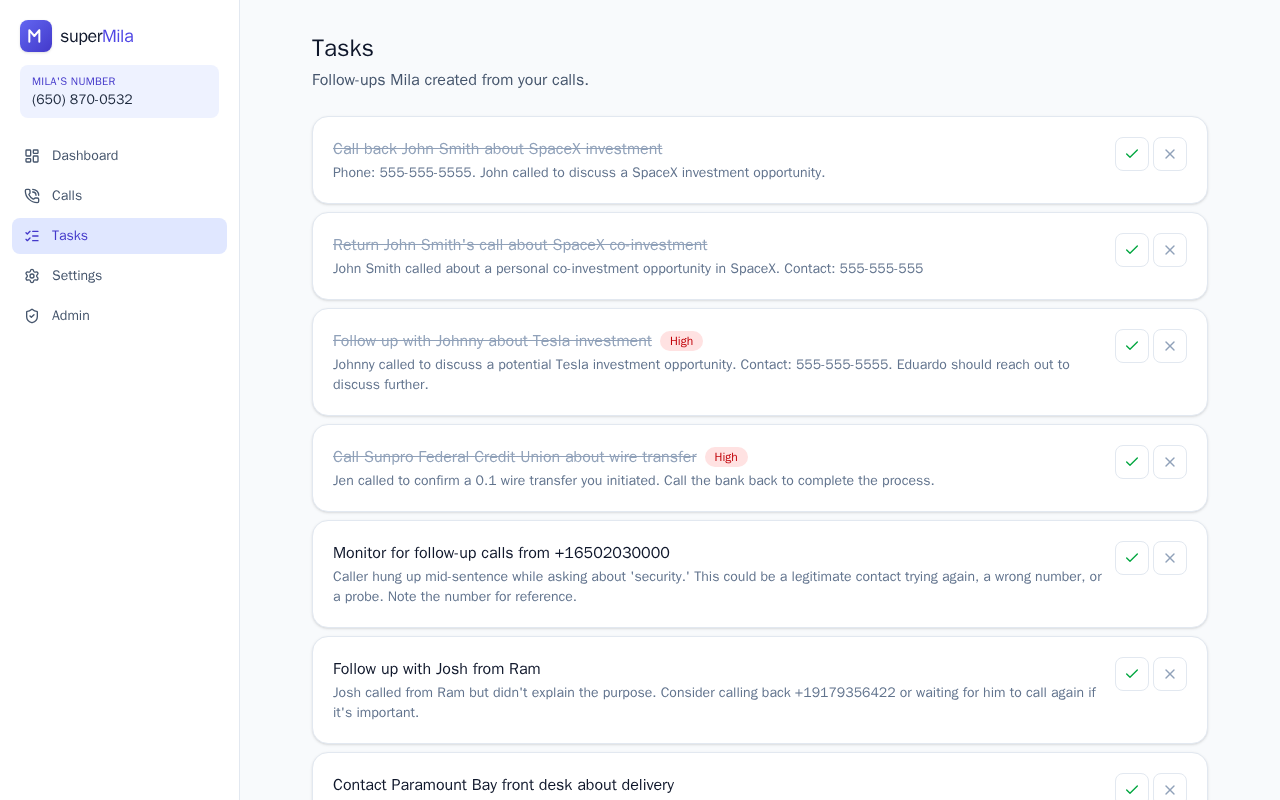
To get to your tasks, select Tasks from the main navigation. You'll see all your active follow-ups displayed as cards in a single list.
Understanding Task Cards
Each card in the Tasks section shows you at a glance:
- Task title – a short label describing the action needed
- Description – more detail about what the task involves
- Status badge – indicates where the task stands (for example, whether it's open, in progress, or completed)
- Priority level – helps you understand how urgently the task needs attention
How Tasks Are Organized
Tasks are grouped by their current status and sorted by the date they were created, so your most recently added items are easy to locate within each status group.
Viewing and Acting on a Task
To see full details for any task, click or tap its card. This opens a detailed view where you can review all the information and take action on the task.
Staying on Top of Your Follow-Ups
Use the status badge and priority level on each card to quickly spot which tasks need your attention most. Regularly checking the Tasks section after your calls ensures nothing falls through the cracks and your follow-ups stay on schedule.